TV screen flashing red, blue, and green:Why is my TV screen flashing red, blue, and green?
Q: Why is my TV screen flashing red, blue, and green?
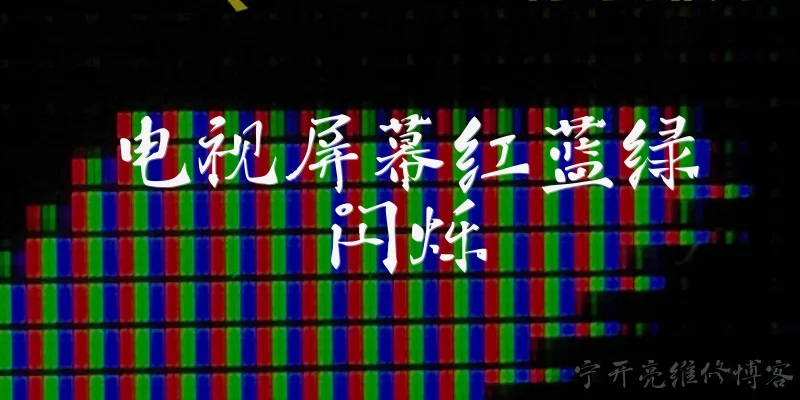
A: A TV screen flashing red, blue, and green is often a sign of a hardware or signal issue. It could be a loose or damaged HDMI cable, a faulty connection port, or a problem with the graphics processor inside the TV. In some cases, it indicates that the TV is stuck in a test pattern mode, which can happen after a power surge or firmware glitch. If the flashing persists across all inputs, the internal circuitry may be failing. Try reseating cables and power-cycling the TV; if that doesn't work, professional repair may be needed.
Q: How can I fix a TV that keeps flashing red, blue, and green?
A: Start by checking all cable connections, especially HDMI and power cords. Swap cables or try a different input source to rule out an external device. Unplug the TV for a few minutes to reset it. If the flashing continues, enter the TV's service menu (if accessible) to see if a test pattern is active. Otherwise, the issue may be a failing T-con board or mainboard. For DIY repairs, inspect for bulging capacitors, but if you're not experienced, contact a qualified technician. Sometimes a firmware update can resolve the glitch.
Q: What does it mean when a TV flashes red, blue, and green in a cycle?
A: A cyclical flash of red, blue, and green usually indicates that the TV is in a diagnostic or panel test mode. Manufacturers use this mode to check pixel functionality during production or after service. If it appears unexpectedly, it may mean the TV's firmware has been corrupted or a button combination on the remote or TV was accidentally pressed. It can also signal a failure in the timing controller (T-con) board, which manages color signals. In many cases, a factory reset or power cycle resolves it; otherwise, the T-con board may need replacement.
Q: Can a faulty HDMI cable cause red, blue, and green flashing on a TV?
A: Yes, a faulty HDMI cable can cause red, blue, and green flashing because it may fail to transmit color channels correctly. Damaged shielding or broken pins can lead to intermittent color signals, resulting in rapid flashes of primary colors. Similarly, a loose connection at either end can cause the same symptom. Try a different HDMI cable and port to see if the issue disappears. If the flashing only occurs on one input, the cable or source device is likely the culprit. If it happens on all inputs, the TV itself is more suspect.
Q: Is a TV flashing red, blue, and green a sign of a serious problem?
A: It can be serious if the flashing persists after basic troubleshooting. While sometimes it's just a loose cable or temporary glitch, it often points to a hardware failure such as a bad T-con board, mainboard, or panel. These components are essential for color processing and display. Ignoring the issue may lead to complete screen failure. If the TV is under warranty, contact the manufacturer. Otherwise, get a repair estimate. In some cases, the cost of repair may exceed the TV's value, especially for older models. Early diagnosis is key.
Dialogue about
Common scenarios of "TV screen flashing red, blue, and green"
【User】 My TV screen keeps flashing red, blue, and green. It's really annoying. What's going on?
【TechSupport】 I'm sorry to hear that. Let's troubleshoot. When did this start happening?
【User】 About an hour ago. I was watching a movie and suddenly the colors started flashing.
【TechSupport】 Does it happen on all inputs, like cable, streaming, or game console?
【User】 Yes, I tried switching to my PlayStation and it still flashes.
【TechSupport】 Okay, so it's likely not a source issue. Have you tried unplugging the TV for a minute and plugging it back in?
【User】 Yes, I did that. No change.
【TechSupport】 What about the TV menu? If you open the settings menu, does the flashing continue over the menu?
【User】 Let me check... Yes, it's still flashing even in the menu.
【TechSupport】 That suggests an internal hardware issue, possibly the T-Con board or panel. Is the TV under warranty?
【User】 I think so, it's only 8 months old.
【TechSupport】 Good. I recommend contacting the manufacturer for a warranty repair. But first, let's try a factory reset to rule out software.
【User】 How do I do that?
【TechSupport】 Go to Settings > System > Reset. But note it will erase your settings.
【User】 Okay, I'll try that. ... It's resetting now. ... Still flashing after reset.
【TechSupport】 Then it's definitely hardware. Contact the manufacturer. Do you have the receipt?
【User】 Yes, I bought it online. I'll call them. Thanks for your help.
【TechSupport】 You're welcome. If they give you trouble, let me know. Good luck!
【User】 Will do. Have a good day.
【TechSupport】 You too. Goodbye.